
If you own a business on the Treasure Coast, whether you’re in Port St. Lucie, Stuart, or Fort Pierce, your Google Business Profile (GBP) is one of the most important pieces of digital real estate you own. It’s the listing that shows up when someone searches for your business by name, and it’s also what puts you on the map (literally) when someone searches for what you do nearby.
Google’s own guidance is direct about the stakes here: businesses with a complete Business Profile are 2.7 times more likely to be seen as respectable, 70% more likely to get a visit, and 50% more likely to be considered for a purchase, compared to businesses with incomplete profiles. And yet, a large share of small businesses still haven’t claimed theirs. BrightLocal’s SMB Marketing Report found that just 35% of SMBs have a Google Business Profile at all, which means most small businesses are leaving free visibility on the table.
This guide breaks down what a Google Business Profile is, how it works, and the specific steps to get your business on Google Maps and ranking in local search.
What is a Google Business Profile
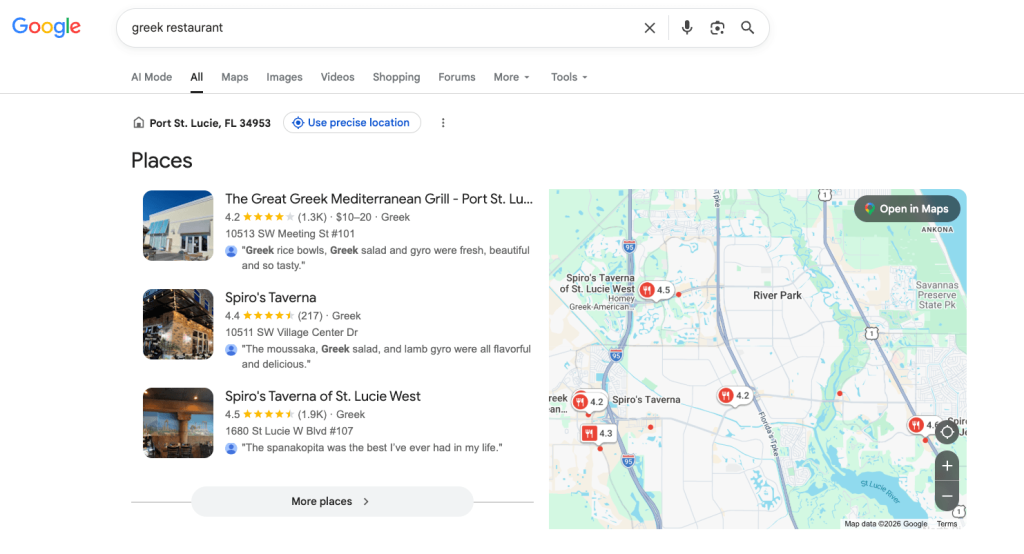
When you set up a profile, your location can show up on maps (Source: Google)
A Google Business Profile is a free business listing that controls how your business appears across Google Search, Google Maps, and Google Shopping. It’s the panel that shows up on the right side of a Google search when someone looks up your business name, and it’s the pin that appears when someone searches for a business type near them, like “Italian restaurant Port St. Lucie” or “dentist Stuart FL.”
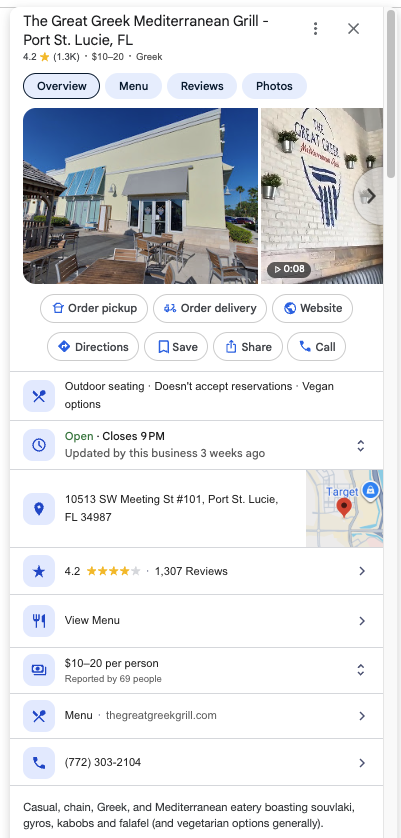
A Google Business Profile example for The Great Greek in Port St. Lucie (Source: Google)
Your profile can include:
- Business name, address, and phone number (NAP)
- Business category (primary and secondary)
- Hours of operation, including holiday hours
- Website link and appointment booking links
- Photos and videos
- Products and services
- Customer reviews and your responses to them
- Posts (updates, offers, and events)
- A Q&A section where customers can ask questions
Google pulls this information from your profile to decide how relevant and trustworthy your business is for a given local search. That’s why an incomplete or outdated profile doesn’t just look unprofessional; it actively holds back your visibility.
Get your business on Google Maps
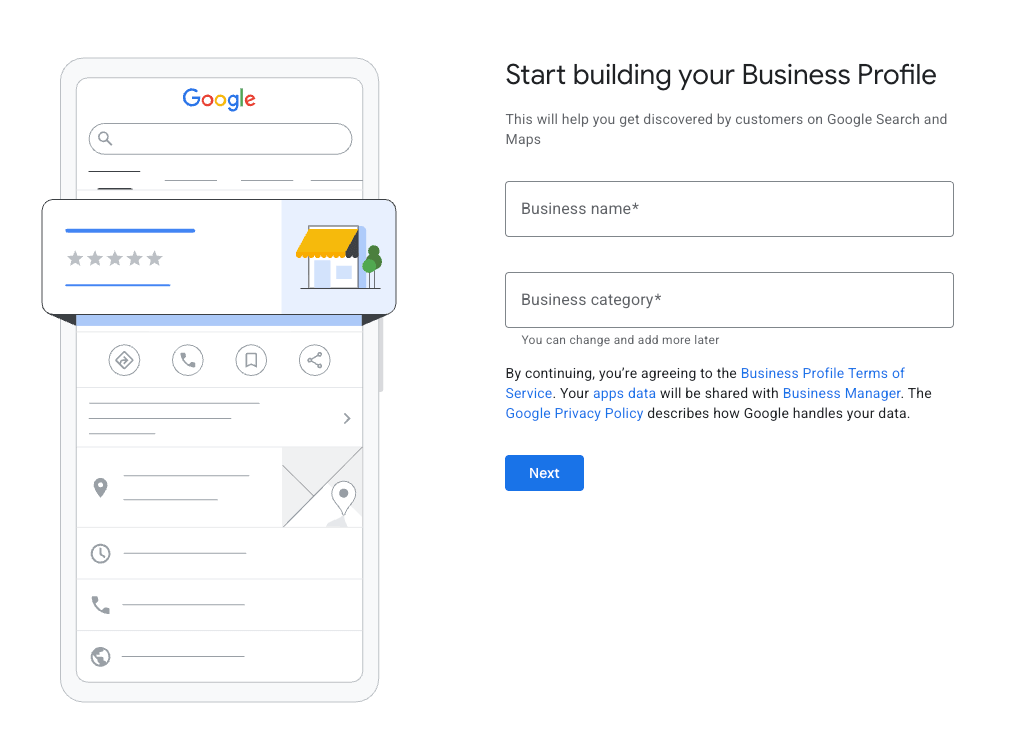
Getting your business to show up on Google Maps starts with claiming and verifying your Google Business Profile. Here’s the process:
- Search for your business on Google. Go to Google and search your business name plus your city. If a listing already exists, you’ll see an option to claim it. If not, you’ll create a new one.
- Go to Google Business Profile Manager. Visit google.com/business and sign in with the Google account you want to manage the listing.
- Enter your business details. Add your business name exactly as it appears on your signage, your address (or service area if you don’t have a public storefront), your category, and your contact information.
- Choose your primary category carefully. Google recommends selecting the most specific category available for your business rather than a broad one. This is one of the strongest local ranking signals you control.
- Verify your business. Google typically verifies businesses by mailed postcard, phone, email, or video, depending on your business type. Verification confirms you’re the legitimate owner and unlocks full control of your listing.
- Complete every section. Once verified, fill in hours, services, photos, and a business description. An incomplete profile is a missed opportunity, since Google fills gaps with less reliable information from elsewhere on the web if you don’t.
Once verified and complete, your business becomes eligible to appear in the “map pack,” the group of three local listings that appears above organic results for local searches. This is prime visibility, since Google determines how it displays your business address based on your business information and information from other sources across the web, which means accuracy and completeness directly affect whether you show up here at all.
What if you don’t have a physical location?
Not every business has a storefront, and Google accounts for that. If you run a service business, like a landscaper, cleaning company, mobile pet groomer, or contractor, or you operate a fully remote or online business, you’re still eligible for a Google Business Profile. You just set it up differently.
In fact, just recently, I had a conversation with an owner of an HVAC company in Palm Beach and Broward. He had issues showing up on Google because he couldn’t verify his address. After I explained that he should really promote himself as a mobile company, since 95% of customer contact is at another location, he changed his setting and is now visible.
Google classifies these listings as service-area businesses: a business that visits or delivers to customers directly but doesn’t serve customers at its own address.
If that’s you, your street address stays hidden on your public profile. Instead, you define a service area made up of the cities, zip codes, or regions you actually serve, up to 20 of them, generally within about a two-hour drive of your base of operations. A “hybrid” business, like a restaurant that also delivers or an auto shop that also offers roadside service, can show both a public storefront address and a service area.
A few things worth knowing if this is you:
- You don’t need a storefront to rank locally. Google still uses your business category, service area, reviews, and profile completeness to decide where you show up, even without public signage.
- Don’t list a home address if you don’t serve customers there. Doing so violates Google’s guidelines and can get your profile suspended. If customers never visit you at your address, that address should be hidden.
- Remote and online-only businesses can still benefit from a profile in some cases, but Google Business Profile is built around local, in-person, or service-area businesses. If your business is entirely online with no service area or local presence at all, your energy is usually better spent on your website’s own SEO rather than forcing a GBP listing that doesn’t fit.
This is also where pairing your Google Business Profile with social media matters most. Without a physical storefront for people to walk past, discover, or photograph, social platforms like Facebook and Instagram become one of your main ways to build the kind of visible, ongoing activity and trust signals that a storefront gets for free. A consistent presence across both Google and social media reinforces the same message to potential customers and to Google itself: this is a real, active, responsive business worth trusting, even if there’s no sign out front.
Why Google Business Profile signals drive your local rankings
Your Google Business Profile isn’t just a listing; it’s one of the biggest factors in whether you rank in local search results at all.
Whitespark’s 2026 Local Search Ranking Factors report, a survey of local SEO experts, found that Google Business Profile signals have the biggest impact on local map pack rankings, ahead of on-page website factors and backlinks. In plain terms, that means your GBP is more influential to your Maps ranking than your website.
That’s a critical distinction for small business owners: your website matters for organic rankings, but your Google Business Profile is what wins you the map pack, and the map pack is what most people click first for local searches like “near me” queries.
The business case for keeping your profile complete and current
Reviews are the other half of this equation. Nearly all consumers now factor reviews into their decision-making, with BrightLocal’s Local Consumer Review Survey finding that 97% of consumers read reviews for local businesses before choosing one. That means your Google Business Profile isn’t just a place to be found, it’s often the first place a potential customer forms an opinion about your business before they ever visit your website or call.
Put together, the data points to a simple conclusion: claiming your profile gets you on the map, but keeping it complete, accurate, and actively managed with reviews and fresh updates is what actually turns that visibility into calls, direction requests, and new customers.
Quick tips to strengthen your Google Business Profile
Here are some ways you can improve your GBP.
- Keep your NAP consistent everywhere. Your business name, address, and phone number should match exactly across your website, your GBP, and any online directories.
- Add photos regularly. Fresh, high-quality photos of your storefront, team, and work signal an active business to both Google and potential customers.
- Fill out your business description completely. Use natural language that reflects how customers actually search for what you do.
- Respond to every review. Thank customers for positive reviews and address negative ones professionally. This shows both Google and future customers that you’re engaged.
- Post updates regularly. Use the Posts feature to share offers, events, or business updates directly in search results.
- Keep your hours accurate. Update special hours around holidays so customers don’t show up to a closed door.
Why Treasure Coast businesses trust PeakHippo with their Google presence

A Google Business Profile is free to create, but getting real results from it takes ongoing attention: the right category, a steady stream of photos and posts, consistent NAP data, and a review strategy that actually gets customers responding. Most business owners are already busy running the business itself, and a profile that gets set up once and forgotten quietly loses ground to competitors who keep showing up.
That’s the gap PeakHippo exists to close. We’re a local specialist built specifically for businesses in Port St. Lucie, Stuart, Jensen Beach, Fort Pierce, and Tradition, not an out-of-state agency treating your listing like just another account. If you want your Google Business Profile working as hard as it should be, so more of your neighbors find you first, reach out to PeakHippo and let’s get your profile built the right way. See how you can improve your local SEO today with our free audit.
FAQs
Is a Google Business Profile really free?
Yes. Creating, claiming, and managing a Google Business Profile costs nothing. Google makes money from ads, not from listings themselves.
How long does it take to verify a Google Business Profile?
Verification methods vary. Some businesses can verify instantly by phone or email, while postcard verification by mail can take one to two weeks.
What’s the difference between Google Business Profile and Google Maps?
Your Google Business Profile is the listing you manage. Google Maps is one of the places that listing appears, alongside Google Search and Google Shopping.
Can I have more than one Google Business Profile?
Yes, if you have more than one physical location, each location needs and is entitled to its own verified profile.
Does posting on my Google Business Profile actually help my ranking?
Posting alone isn’t a confirmed direct ranking factor, but it keeps your profile active and can improve engagement, which supports the overall signals Google uses to judge how relevant and trustworthy your business is.
What hurts a Google Business Profile’s local ranking the most?
Inconsistent NAP information, an incomplete profile, an incorrect business category, and a thin or stagnant review profile are among the most common issues holding local businesses back.